The Best AI 3D Model Generators, Picked by the Job You Need Done
There is no single best AI 3D model generator. One is great at clean shapes, another rigs strange creatures, and another gives you hundreds of human animations. The best one is the one that fits the job you need done. This guide sorts the main tools by job, so you can pick two to try instead of nine.
By the Bake3D teamUpdated 8 min read
Short answer
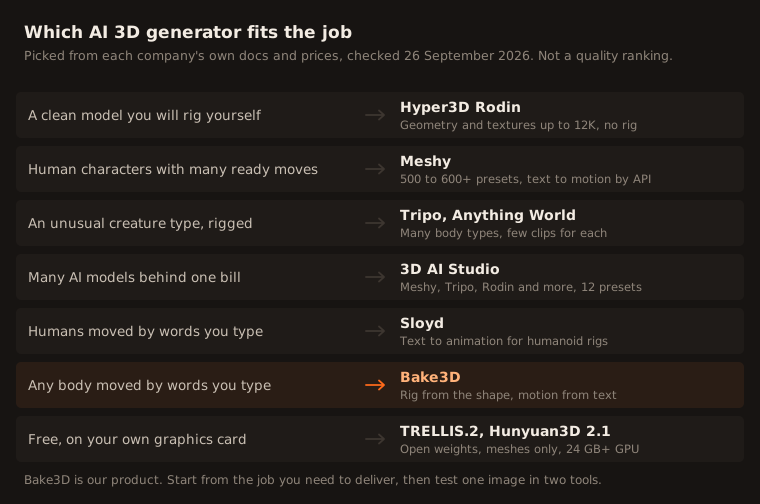
The best AI 3D model generator depends on the job. For clean shapes you will rig yourself, try Hyper3D Rodin. For human characters with many ready moves, try Meshy. For unusual creatures that need a rig, try Tripo or Anything World. To test many AI models with one account, try 3D AI Studio. To move any body with words you type, try Bake3D. For free, run TRELLIS.2 on your own GPU.
How we checked this: Every fact about each tool comes from that company's own docs and pricing pages, read on 26 September 2026 and linked under Sources. We did not run the same image through every tool, so this sorts tools by features and price, not by how good their models look. Bake3D details come from our own product.
Start with the job, not the tool
AI 3D model generators all start the same way. You give them a picture or a sentence, and they give you a textured 3D model a few minutes later. After that, they split in different directions.
Some stop at the mesh and try to make it as clean as possible. Some add a skeleton so the model can move. Some add hundreds of ready animations, and a few let you describe new motion in words. So the first question is not “which tool is best”. It is “what do I need at the end”: a still model, a rigged model, or a model that moves.
The nine tools at a glance
| Tool | Best for | Rig and animation | Cheapest paid plan | Free plan |
|---|---|---|---|---|
| Meshy | Human characters with many moves | Yes. Animals only walk | $20 a month, 1,000 credits | 100 credits, no downloads |
| Tripo | Rigging unusual creatures | Yes. Few clips per creature | $20 a month, 3,000 credits | 200 credits, non-commercial |
| Hyper3D Rodin | Clean shapes to rig yourself | No | $24 a month billed yearly | Pay per model you keep |
| 3D AI Studio | Many AI models, one account | Yes. 12 presets | $19 a month, 1,000 credits | Some credits, amount not stated |
| Anything World | Ready clips for set categories | Yes. Clips vary by category | Not verified | 4 models, 2 animated a month |
| Sloyd | Humans moved by text | Humans only | $15 a month | 1 model a day, personal use |
| Bake3D | Any body moved by text | Yes. Any body | $10 for 400 credits | 70 credits, personal use |
| TRELLIS.2 | Free, on your own GPU | No | Free, MIT license | Free |
| Hunyuan3D 2.1 | Free, on your own GPU | No | Free, license limits | Free |
For a clean model you will rig yourself: Hyper3D Rodin
Rodin makes models from text or from one to five images. Its Gen-2.5 models can write meshes from four-sided or three-sided faces, with textures up to 12K. It has no rigging and no animation. It can pose a character in a T-pose or A-pose, so it is easier to rig in another tool.
The free plan lets you pay only for results you keep, at $1.50 a credit. The paid plans add export and use for any purpose. Creator is $30 a month, or $24 a month billed yearly, for about 60 models. Rodin exports GLB, USDZ, FBX, OBJ and STL.
Pick it when the shape matters most and you already rig in Blender or Maya. Our guide on how to rig in Blender covers the next step.
For human characters with many moves: Meshy
Meshy makes models from text, one image or several images. Its newest model, meshy-7.1, came out on 18 September 2026. It can remesh a model, unwrap its UVs and split it into parts for 3D printing.
It rigs humanoids and four-legged animals, plus other bodies with a beta tool called Smart Rig. For people, it lists 500 to 600 or more animation presets, and since August 2026 its API can make motion from text. For four-legged animals, its help center says walking is the only animation it supports. Pro is $20 a month for 1,000 credits. Free users cannot download models.
Pick it when your characters are human and a large ready library saves you time.
For creatures of many kinds: Tripo and Anything World
Tripo rigs two-legged characters plus quadrupeds, hexapods, octopods, birds, snakes and sea creatures. People get more than 90 animations. Most creature types get one clip, such as a walk, and no clip is listed for birds. Its newest model, P2.0, came out on 21 September 2026 and makes meshes from four-sided faces. Pro is $20 a month for 3,000 credits.
Anything World, which now trades as Everything Universe, rigs a long list of categories, from dogs and insects to fish, snakes and vehicles with two, three or four wheels. Clips depend on the category: about 8 base clips for two-legged characters, about 20 for dogs and cats, and 2 for a tortoise. Models over 20,000 points are simplified, and processing takes 8 to 30 minutes.
Pick one when your subject fits their list of body types and the ready clips cover what you need. Count the clips for your body type before you commit.
For many AI models behind one account: 3D AI Studio
3D AI Studio runs other companies’ models, including Meshy, Tripo, Rodin, Hunyuan3D and TRELLIS 2, and bills you from one credit balance. Rigging runs through a model called Prism or through Meshy. It has 12 animation presets, such as walk, run, jump and dance.
Plans start at $19 a month for 1,000 credits, and commercial use is allowed on every plan. It also has an API and MCP.
Pick it when you want to try several generators on the same image before you settle on one.
For motion you describe in words: Sloyd and Bake3D
Most tools give you a fixed list of clips. Two let you type the motion you want instead.
Sloyd makes game-style models and rigs humanoid characters in a T-pose or A-pose. Its text to animation is for those human rigs. Plus is $15 a month, and Pro is $50 a month with the right to resell models.
Bake3D is our own tool, so read this part with that in mind. It makes a model from one to four images or a text prompt, then plans the skeleton from the model’s real shape. Legs, wings, tails and wheels each get their own joints. You can type a motion for any body, like “wag the tail and look left”, or use free presets such as a walk, trot, run and jump that are fitted to the legs. A rigged model costs 65 credits, and packs start at $10 for 400 credits. It does not rig models you upload and does not animate faces.
Pick Sloyd when your characters are human. Pick Bake3D when you need an animal, creature or machine to do more than walk. See the AI 3D animation page for how it works.
For free: TRELLIS.2 and Hunyuan3D 2.1
If you have a strong graphics card, you can run an open model yourself at no cost.
- TRELLIS.2 from Microsoft came out in December 2025 under the MIT license. It turns one image into a textured GLB. It needs an NVIDIA GPU with at least 24 GB of memory.
- Hunyuan3D 2.1 from Tencent makes a shape and paints it. It needs about 29 GB of GPU memory. Its license does not apply in the EU, the UK or South Korea, and services with more than 1 million monthly users need a separate license.
Neither one rigs or animates, and you set them up yourself. They are great for learning and for still props.
What to check before you pay
Prices and feature lists only tell you so much. Before you commit to any AI 3D model generator, run one of your own images through two tools on their free plans and check these five things.
- The back and the sides. One picture cannot show the back, so the AI invents it. Turn the model all the way around. If you can, add more views, as our guide on character turnaround sheets explains.
- The polygon count. Game and web models need to stay light. Our guide on reducing polygon count gives target numbers.
- The file you need. Use GLB or FBX for a rigged, animated model, and STL or 3MF for printing. Some tools keep only the shape in OBJ, STL and 3MF. Read what a GLB file is if you are not sure.
- The rig, if you need one. Bend the knees, lift the arms and look for skin that stretches or tears. Our rig checklist shows where problems hide.
- The license. Free plans often allow personal use only, or ask you to credit the tool. If you plan to sell models, read our guide on selling 3D models first.
Where Bake3D fits, honestly
Bake3D is not the cheapest way to get a still model. Tripo and Meshy give you more models per dollar, and Rodin puts more focus on the shape itself. If you only need a static prop, one of those is a fine choice.
Bake3D is built for the next step: getting any body to move. A dog, a dragon or a toy car gets a rig planned from its own shape, and you can describe new motion in words. If that is your job, you can try it with 70 free credits and no card. Start from the image to 3D page, or compare it with Meshy in our Meshy alternatives guide.
How we compared these tools
We read each company’s own pricing page, docs and changelog on 26 September 2026 and linked them under Sources. We sorted tools by what they document, not by how their models look, because we did not run the same image through every tool. Where a company’s pages disagree, as Meshy’s preset counts do, we give the range. Prices and credit costs change often, so check each pricing page before you buy. For a head-to-head of the two biggest names, read Meshy vs Tripo.
Questions people ask
What is the best AI 3D model generator?
It depends on what you need. Rodin focuses on clean shapes and textures. Meshy has the most animations for people. Tripo rigs the most creature types. 3D AI Studio puts many models behind one account. Bake3D rigs any body from its shape and moves it from text. Test one of your own images in two tools before you pay.
Is there a free AI 3D model generator?
Yes. TRELLIS.2 from Microsoft is free under the MIT license, but you run it yourself on an NVIDIA GPU with at least 24 GB of memory. Hosted tools with free plans include Tripo, with 200 credits for non-commercial use, and Bake3D, with 70 credits for personal use.
Can AI make a 3D model from one picture?
Yes. Meshy, Tripo, Rodin, 3D AI Studio, Bake3D and the open models all make a textured 3D model from one image. The back of the model is a guess, since the picture does not show it. Some tools, including Rodin, Tripo and Bake3D, also accept extra views of the same subject, which gives the AI less to guess.
Which AI 3D generators can rig and animate a model?
Meshy, Tripo, 3D AI Studio, Anything World, Sloyd and Bake3D can all rig and animate. They differ in which bodies they rig and how much motion each body gets. Rodin and the open models make the mesh only, so you rig it yourself.
Can I use AI-generated 3D models commercially?
On paid plans, usually yes, but read each license. Meshy's free models need credit to Meshy. Tripo's and Sloyd's free plans do not allow business use. 3D AI Studio allows commercial use on every plan. Bake3D allows it for models made with purchased credits.
Sources
- Meshy pricing
- Meshy Help Center, auto-rigging and animation
- Meshy API changelog
- Tripo pricing
- Tripo developer docs, rigging
- Hyper3D pricing
- Hyper3D Rodin Gen-2.5 API
- 3D AI Studio pricing
- 3D AI Studio docs, rigging
- Anything World, Animate Anything FAQ
- Sloyd pricing
- Sloyd animations
- Microsoft TRELLIS.2 on GitHub
- Tencent Hunyuan3D 2.1 on GitHub
- Tencent Hunyuan3D 2.1 license
About this guide
Written and kept up to date by the Bake3D team. We build a tool that turns one image into a textured, rigged and animated 3D model, and we test the steps in our guides on our own files. First published . See how we write and check guides, or send a correction to hello@bake3d.ai.
Keep reading
AI 3D tools
Meshy Alternatives for 3D Models, Rigging and Animation
Looking for a Meshy alternative? Compare Tripo, Rodin, 3D AI Studio, Anything World, Sloyd, Bake3D and free open models by rigging, animation and price.
AI 3D tools
Meshy vs Tripo: Which AI 3D Generator Fits Your Project?
Meshy vs Tripo compared on models, rigging, animation, file formats, free plans and credit prices, from each company's own docs, checked September 2026.
Rigging tools
Mixamo Alternatives for Animals, Creatures and Robots
Mixamo only rigs humanoids. Compare free and paid Mixamo alternatives, from AccuRIG and Rigify to AI tools, by the body types they can rig.