Meshy vs Tripo: Which AI 3D Generator Fits Your Project?
Meshy and Tripo are two of the most popular AI 3D generators. Both turn a picture or a sentence into a textured 3D model, and both can rig and animate it. They are close on price, but they differ in what they rig, how much motion you get and what the free plans allow. Here is how they compare, side by side.
By the Bake3D teamUpdated 5 min read
Short answer
Pick Meshy if your characters are mostly human and you want a big animation library, text to motion through the API and many export formats. Pick Tripo if you need to rig unusual creatures such as birds, snakes or insects, or want more credits for the same $20. For animals that must do more than walk, neither is ideal, since both give non-human bodies very few clips.
How we checked this: Every fact here comes from Meshy's and Tripo's own docs, pricing pages and changelogs, read on 26 September 2026 and linked under Sources. We did not run the same image through both tools, so this compares features and prices, not the quality of their models.
The short verdict
Meshy and Tripo are closer than most comparisons suggest. Both make a model from text, one image or several images. Both rig and animate. Both cost $20 a month to start, and both have an API and an MCP server.
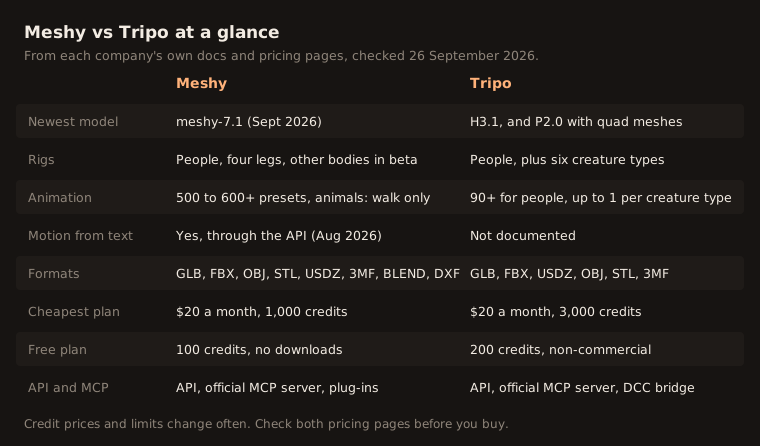
The real differences are in three places: which bodies they can rig, how much motion each body gets, and what the free plans let you do. The table below sums it up, and the sections after it go through each part.
Making the 3D model
Meshy added its meshy-7.1 model on 18 September 2026. It can make textures up to 8K, remesh a model, unwrap its UVs and split it into parts for 3D printing.
Tripo has two main model lines. H3.1 is its newest general model. P2.0, released on 21 September 2026, makes meshes built from four-sided faces, which are easier to edit and animate. Tripo also offers segmentation and a smart low-poly option.
We did not run the same image through both, so we cannot say which one looks better. If model quality matters most, try one image you care about in both free plans.
Rigging
This is where they differ most.
Meshy rigs humanoid characters and four-legged animals. For other bodies, it has a beta tool called Smart Rig. Meshy says props, buildings and vehicles cannot be rigged, and its API docs say rigging works best on standard two-legged characters. The character should stand close to a T-pose or A-pose.
Tripo has two riggers. The older one rigs two-legged characters only. The newer one, from February 2026, adds quadrupeds, hexapods, octopods, birds, snakes and sea creatures. You can also pick Mixamo-style bone names, which helps if you use Mixamo animations.
If your character is not human, Tripo documents more options. If you want to know what a rig is and why this matters, read what rigging is.
Animation
Meshy has the bigger library for people. Its pages list 500 to 600 or more presets. In August 2026, it added text to motion to its API, where you describe a move and get an animation back. For four-legged animals, though, its help center says walking is the only animation it supports.
Tripo lists more than 90 animations for two-legged characters rigged with its older rigger, and 11 for those rigged with the newer one. For most creature types from the newer rigger, it lists one clip, such as a walk for a quadruped or insect. It lists no clip for birds. Its docs do not mention motion from text.
So for people, Meshy offers more. For animals and creatures, both are thin: one walk, or at most one clip per body type. A walk alone is often not enough for a game. Our guide to the quadruped walk cycle shows how much goes into even one good animal walk.
File formats
Meshy exports GLB, FBX, OBJ, STL, USDZ, 3MF, BLEND and DXF. The rig and animation come through in GLB and FBX.
Tripo exports GLB, FBX, USDZ, OBJ, STL and 3MF. Its docs say OBJ, STL and 3MF keep only the shape.
For a rigged, animated character, use GLB or FBX in either tool. Our guide on GLB to FBX explains when you need which.
Price and credits
| Meshy | Tripo | |
|---|---|---|
| Cheapest paid plan | Pro, $20 a month, 1,000 credits | Pro, $20 a month, 3,000 credits |
| Bigger plans | Premium $40 (3,000), Ultra $100 (8,000) | Max $90 (25,000), Team per seat |
| Image to model (web app) | 20 to 25 credits | 15 for HD, plus 10 for texture |
| Rig and animate (web app) | Free | 20 credits to rig |
| Rig, then one clip (API) | 5, then 3 | 25, then 10 |
| Deals | 50% off the first month, 20% off yearly | Team seats cost less billed yearly |
Tripo gives three times the credits for the same $20. Meshy charges nothing extra to rig and animate in its web app, while Tripo charges 20 credits to rig. Which one is cheaper for you depends on how many models you make and how many you rig.
Free plans and licenses
Meshy gives 100 free credits, but free users cannot download models. Free models are licensed CC BY 4.0, which means you must credit Meshy. On a paid plan, you own what you make.
Tripo gives 200 free credits, one job at a time, and up to 15 exports. Free models are public and cannot be used commercially.
For a real product, plan on paying for either tool.
API, MCP and plug-ins
Both have a REST API and an official MCP server, so an AI assistant can make and download models for you. Meshy has plug-ins for Blender, Unity, Unreal, 3ds Max and Roblox. Tripo’s DCC bridge on paid plans connects to Blender, 3ds Max, Unity, Unreal, Maya, Godot and ZBrush.
Which one should you choose?
- Human characters, lots of moves: Meshy.
- Unusual creatures that just need to be rigged: Tripo.
- Most credits for $20: Tripo.
- Rigging and animation at no extra credit cost: Meshy.
- Many file formats, including BLEND and 3MF: Meshy.
Where Bake3D fits
If your subject is an animal, a creature or a machine, and it needs to do more than walk, both tools leave a gap. That is the gap Bake3D is built for, and yes, Bake3D is ours.
Bake3D makes a model from one image, plans a rig from its real shape, and lets you describe new motion for any body. Free presets include a walk, trot, run and jump fitted to the legs. It does not rig models you upload, and it costs more per model than Tripo. See the AI 3D animation page, or the wider Meshy alternatives comparison.
How we compared Meshy and Tripo
We read both companies’ pricing pages, docs and changelogs on 26 September 2026 and linked them under Sources. When one company’s pages disagreed, such as Meshy’s preset count, we gave the range. We did not run the same image through both tools, so this is about features and prices, not model quality. Both change their plans often, so check the pricing pages before you buy.
Questions people ask
Is Meshy or Tripo cheaper?
Both start at $20 a month. Meshy Pro gives 1,000 credits and Tripo Pro gives 3,000. Credit costs differ too, so compare the cost of the jobs you will actually run. In the web apps, a Meshy image to 3D model costs 20 to 25 credits, and a Tripo HD model with texture costs 25, plus 20 to rig it.
Which one is better for animals?
Tripo rigs more body types, including birds, snakes, insects and sea creatures, but lists at most one clip for each creature type, and none for birds. Meshy rigs four-legged animals and says walking is the only animation it supports for them. If your animal needs more motion, look at a tool that makes new motion for any rig.
Can I use Meshy or Tripo for free?
Both have free plans with limits. Meshy's free plan gives 100 credits, but free users cannot download models. Tripo's free plan gives 200 credits for public, non-commercial models. For business use, you need a paid plan on both.
Do Meshy and Tripo have an API and MCP?
Yes. Both have a REST API and an official MCP server, so AI assistants such as Claude can call them. Both also connect to Blender, Unity and Unreal, Meshy through plug-ins and Tripo through its DCC bridge.
Which one exports more file formats?
Meshy lists eight formats, including BLEND, 3MF and DXF. Tripo lists six, including USDZ and 3MF. For a rigged, animated model, use GLB or FBX in either tool.
Sources
- Meshy pricing
- Meshy web app pricing (credit costs)
- Meshy API changelog
- Meshy Help Center, auto-rigging and animation
- Meshy Help Center, file formats
- Tripo pricing
- Tripo developer docs, rigging
- Tripo developer docs, animation retargeting
- Tripo developer docs, format conversion
- Meshy MCP server on GitHub
- Tripo MCP server on GitHub
About this guide
Written and kept up to date by the Bake3D team. We build a tool that turns one image into a textured, rigged and animated 3D model, and we test the steps in our guides on our own files. First published . See how we write and check guides, or send a correction to hello@bake3d.ai.
Keep reading
AI 3D tools
Meshy Alternatives for 3D Models, Rigging and Animation
Looking for a Meshy alternative? Compare Tripo, Rodin, 3D AI Studio, Anything World, Sloyd, Bake3D and free open models by rigging, animation and price.
AI 3D tools
The Best AI 3D Model Generators, Picked by the Job You Need Done
The best AI 3D model generators compared by job: Meshy, Tripo, Rodin, 3D AI Studio, Anything World, Sloyd, Bake3D and free open models, with prices.
Rigging tools
Mixamo Alternatives for Animals, Creatures and Robots
Mixamo only rigs humanoids. Compare free and paid Mixamo alternatives, from AccuRIG and Rigify to AI tools, by the body types they can rig.