Meshy Alternatives for 3D Models, Rigging and Animation
Meshy is one of the best-known AI 3D generators, and it is good at a lot. It is not the right fit for every project. Maybe your animals need to do more than walk, you want a free plan you can download from, or you want a different price. This guide compares the main Meshy alternatives by what each one really offers.
By the Bake3D teamUpdated 8 min read
Short answer
The best Meshy alternative depends on what you need. For the most rig types, look at Tripo. For clean geometry you will rig elsewhere, look at Hyper3D Rodin. For many AI models behind one bill, look at 3D AI Studio. For ready clips on animals and vehicles, look at Anything World. To animate any body from one image with motion you describe, look at Bake3D. For free, run TRELLIS.2 on your own GPU.
How we checked this: Every fact about each tool comes from that company's own docs and pricing pages, read on 26 September 2026 and linked under Sources. We did not run the same image through every tool, so this compares features and prices, not the quality of the models. Bake3D details come from our own product.
Why people look for a Meshy alternative
Meshy turns an image or a text prompt into a textured 3D model. It can also rig and animate some of them. Most people who search for an alternative have one of four reasons.
- The free plan has no downloads. Meshy’s help center says free users cannot download generated models. Free models are also licensed CC BY 4.0, so you must credit Meshy.
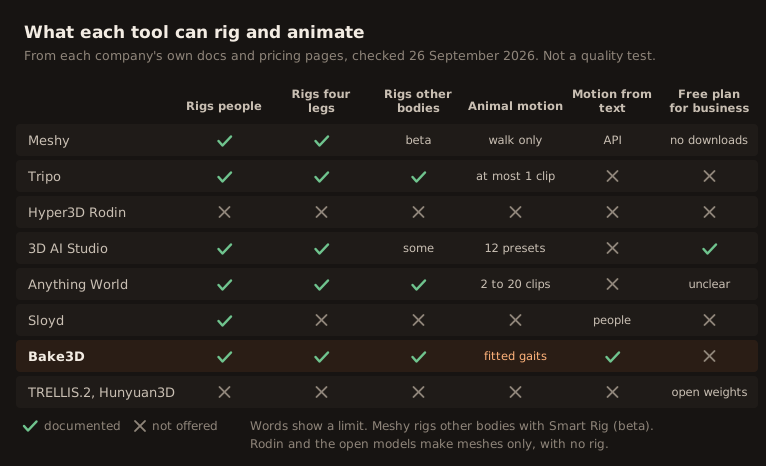
- Animals only walk. Meshy rigs humanoids and four-legged animals, plus other bodies with a beta tool called Smart Rig. But its help center says walking is the only animation it supports for quadrupeds.
- Props and vehicles cannot be rigged. Meshy says props, buildings and vehicles are not supported by its rigging. Its API docs add that rigging works best on standard two-legged characters.
- Price. The Pro plan is $20 a month for 1,000 credits, and an image to 3D model costs 20 to 25 credits in the web app. That is fair, but other tools give more credits for the same money.
None of this makes Meshy a bad tool. It just means the right choice depends on your project.
Meshy alternatives at a glance
| Tool | Pick it when you want | Rigging | Cheapest paid plan | Free plan |
|---|---|---|---|---|
| Tripo | The most rig types | People plus six creature types | $20 a month, 3,000 credits | 200 credits, non-commercial |
| Hyper3D Rodin | Clean geometry to rig yourself | None | $24 a month billed yearly | Pay per model |
| 3D AI Studio | Many AI models, one bill | People, four legs, some others | $19 a month, 1,000 credits | Credits, amount not stated |
| Anything World | Ready clips for many animals and vehicles | Many categories | Not verified | 4 models and 2 animated a month |
| Sloyd | People with motion from text | People only | $15 a month | 1 model a day, personal use |
| Bake3D | Any body, motion you describe | People, four legs, wings, tails, wheels | $10 for 400 credits | 70 credits, personal use |
| TRELLIS.2 | Free, on your own GPU | None | Free | Free, MIT license |
Tripo
Tripo makes models from text, one image or several views. Its newest models are H3.1 and P2.0. P2.0 came out on 21 September 2026 and makes meshes built from four-sided faces.
Tripo has the widest list of rig types among the hosted tools. Its current rigger handles two-legged characters plus quadrupeds, hexapods, octopods, birds, snakes and sea creatures. For people, it has more than 90 animations. For most creature types, it lists one clip, such as a walk, and for birds it lists none. Its docs do not mention motion from text.
You can export GLB, FBX, USDZ, OBJ, STL and 3MF. Its docs say OBJ, STL and 3MF keep only the shape, so use GLB or FBX for a rigged model. Pro is $20 a month for 3,000 credits, and the free plan gives 200 credits for public, non-commercial models. Tripo also has an API, an official MCP server and a bridge to Blender, Unity, Unreal, Godot and more.
Pick Tripo when you need a rigged creature of an unusual type and one clip per creature is enough.
Hyper3D Rodin
Rodin makes models from text or one to five images. Its Gen-2.5 models can write four-sided or three-sided meshes and textures up to 12K. It focuses on geometry and has no rigging and no animation. It can make a character in a T-pose or A-pose so that you can rig it in another tool.
The free plan lets you pay only for results you keep, at $1.50 a credit. The paid plans are the ones that include export and use for any purpose. The Creator plan is $30 a month, or $24 a month billed yearly, for about 60 models. The API comes with the Business plan. Rodin exports GLB, USDZ, FBX, OBJ and STL, and it has add-ons for most 3D apps.
Pick Rodin when you care most about geometry and texture, and you will rig and animate in Blender or another tool.
3D AI Studio
3D AI Studio runs other companies’ models behind one account. You can pick Meshy, Tripo, Rodin, Hunyuan3D, TRELLIS 2 and others, and pay with one credit balance.
Rigging runs through a model called Prism or through Meshy. Its docs list people, four legs, birds and snakes, while its tool page lists seven body types, so check before you rely on it. It has 12 animations, such as walk, run, jump, dance and wave, and no motion from text. An image to 3D model costs 20 credits, a rig 15 or 20, and each animation 15.
Plans start at $19 a month for 1,000 credits. Commercial use is allowed on every plan. It also has an API and MCP.
Pick 3D AI Studio when you want to try several AI models without paying several companies.
Anything World
Anything World now trades as Everything Universe. Its Animate Anything service rigs a very wide list of categories: people, many four-legged animals, insects, spiders, birds, fish, snakes, and vehicles with two, three or four wheels.
The number of ready clips depends on the category. Two-legged characters get about 8 base clips plus packs, dogs and cats get about 20, and a tortoise gets 2. There is no motion from text. Uploads can be up to 30 MB, models over 20,000 points are simplified, and processing takes 8 to 30 minutes. The free tier gives 4 generated and 2 animated models a month. We could not find current paid prices without signing up.
Pick Anything World when your subject fits one of its categories and its ready clips cover what you need.
Sloyd
Sloyd makes game-style models and rigs humanoid characters in a T-pose or A-pose. Its standout feature is text to animation, where you describe a motion for a human character. Plus is $15 a month, and Pro is $50 a month with the right to resell models. It exports GLB, FBX, USD, USDZ and BLEND.
Pick Sloyd when your characters are human and you want to describe their motion in words.
Bake3D
Bake3D is our own tool, so read this part with that in mind. It makes a textured model from one to four images or a text prompt, then plans a skeleton from the model’s real shape. That means four legs, wings, tails and wheels each get their own joints.
For motion, you can describe what the character should do in a sentence, on any body. Seventeen presets are free, including a walk, trot, run and jump fitted to the length and number of legs, plus flap, slither and swim. You can read more on the AI 3D animation page.
A rigged model at Standard costs 65 credits, and each described motion costs 10. Packs start at $10 for 400 credits, and Pro is $24 a month for 1,300. New accounts get 70 free credits for personal use. You can export GLB and FBX with animation, and STL or OBJ of a pose. Bake3D does not rig models you upload, does not animate faces, and has no USD export.
Pick Bake3D when you want a character, animal or machine to move in ways you describe, starting from one picture.
Free and open-source options
If you have a strong graphics card, two open models are worth a look.
- TRELLIS.2 from Microsoft came out in December 2025 under the MIT license. It turns one image into a textured mesh in GLB format. It needs an NVIDIA GPU with at least 24 GB of memory.
- Hunyuan3D 2.1 from Tencent makes a shape and paints it. It needs about 29 GB of GPU memory. Read the license first: it does not apply in the EU, the UK or South Korea.
Neither one rigs or animates. You would rig the model yourself, as in our guide on how to rig in Blender.
Which Meshy alternative should you pick?
Start with what you need to deliver, not with the tool.
- A human character with lots of ready moves: Meshy is still strong here. Sloyd adds motion from text for people.
- An unusual creature, rigged: Tripo or Anything World, then check how many clips your type gets.
- An animal or machine that must do more than walk: Bake3D, because you can describe new motion for any rig.
- Geometry only, as clean as possible: Hyper3D Rodin.
- Several AI models to test: 3D AI Studio.
- Zero cost: TRELLIS.2 on your own GPU, plus rigging by hand.
Whatever you pick, check the rig before you animate. Our rig checklist shows what to look for.
What Meshy still does well
It is fair to say what Meshy is good at. It has the largest animation library for human characters in this list, with more than 500 presets. It added text to motion to its API in August 2026. It exports eight formats, including BLEND and 3MF, and has plug-ins and an official MCP server. If your characters are human and you are happy on a paid plan, you may not need an alternative at all.
How we compared these tools
We read each company’s own pricing page, docs and changelog on 26 September 2026. Where two of a company’s pages disagreed, we say so. We did not sign up for paid plans or run the same image through every tool, so this is a comparison of features and prices, not of how good the models look. Prices and credit costs change often, so check the linked pages before you buy.
Questions people ask
Is there a free Meshy alternative?
Yes. TRELLIS.2 from Microsoft is free and open source under the MIT license, but it needs an NVIDIA GPU with at least 24 GB of memory and makes meshes only, with no rig. Hosted tools with free plans include Tripo (200 credits, non-commercial) and Bake3D (70 credits, personal use).
Why can't I download models on Meshy's free plan?
Meshy's help center says free users cannot download generated models. Free plan models are also licensed CC BY 4.0, which means you must credit Meshy when you use them. Downloads start with the Pro plan at $20 a month.
Which Meshy alternative can rig animals?
Tripo, Anything World and Bake3D all document rigs for four-legged animals and other bodies. They differ in motion. Tripo lists at most one clip per creature type, Anything World has 2 to about 20 clips per category, and Bake3D fits walk, trot, run and jump to the legs and makes new motion from text.
Is Meshy better than Tripo?
They are close. Both start at $20 a month. Meshy has the bigger animation library for people and a text to motion API. Tripo documents more rig types and gives more credits for the same price. Our Meshy vs Tripo guide compares them side by side.
Does Bake3D rig a 3D model I already have?
No. Bake3D makes a new model from your image or text and then rigs it. If you already have a finished model, a tool that rigs uploaded files, such as Tripo, 3D AI Studio or Anything World, is the better fit.
Sources
- Meshy pricing
- Meshy Help Center, free plan downloads
- Meshy Help Center, auto-rigging and animation
- Meshy API, rigging and animation
- Tripo pricing
- Tripo developer docs, rigging
- Tripo developer docs, animation retargeting
- Hyper3D pricing
- Hyper3D Rodin Gen-2.5 API
- 3D AI Studio pricing
- 3D AI Studio docs, rigging
- Anything World, Animate Anything FAQ
- Sloyd pricing
- Microsoft TRELLIS.2 on GitHub
- Tencent Hunyuan3D 2.1 license
About this guide
Written and kept up to date by the Bake3D team. We build a tool that turns one image into a textured, rigged and animated 3D model, and we test the steps in our guides on our own files. First published . See how we write and check guides, or send a correction to hello@bake3d.ai.
Keep reading
AI 3D tools
Meshy vs Tripo: Which AI 3D Generator Fits Your Project?
Meshy vs Tripo compared on models, rigging, animation, file formats, free plans and credit prices, from each company's own docs, checked September 2026.
AI 3D tools
The Best AI 3D Model Generators, Picked by the Job You Need Done
The best AI 3D model generators compared by job: Meshy, Tripo, Rodin, 3D AI Studio, Anything World, Sloyd, Bake3D and free open models, with prices.
Rigging tools
Mixamo Alternatives for Animals, Creatures and Robots
Mixamo only rigs humanoids. Compare free and paid Mixamo alternatives, from AccuRIG and Rigify to AI tools, by the body types they can rig.