What Is a GLB File?
GLB is the file type behind most 3D models on the web. It packs the shape, the colors, the skeleton and the animation into one tidy file. This guide explains what is inside, how GLB compares to glTF, FBX, OBJ and STL, and how to open one on any device in 2026.
By the Bake3D teamUpdated 6 min read
Short answer
A GLB file is a 3D model saved in the glTF 2.0 binary format. One .glb file holds everything a 3D scene needs, including the mesh, materials, textures, skeleton and animations. You can open it in Blender, in free web viewers, and in Preview on macOS 27. GLB is the one-file version of glTF, an open standard from the Khronos Group.
How we checked this: The format details come from the Khronos glTF 2.0 specification. The Windows and Mac notes come from Microsoft's and Apple's own support pages, checked on 25 September 2026. Bake3D writes GLB files every day, and the sample numbers come from our own fox model.
If a photo is a JPG, a 3D model is often a GLB. The Khronos Group, which looks after the glTF format, even calls glTF “the JPEG of 3D”. It is small, open and easy for browsers and apps to load. That is why so many AI 3D tools, web viewers and game engines use it.
What does GLB stand for?
GLB is short for GL Transmission Format Binary. It is the binary version of glTF. The Khronos Group released glTF 2.0 on June 5, 2017. In 2022 it also became an international standard, ISO/IEC 12113:2022. Anyone can use it for free.
What is inside a GLB file?
A GLB file is built in three parts, one after the other.
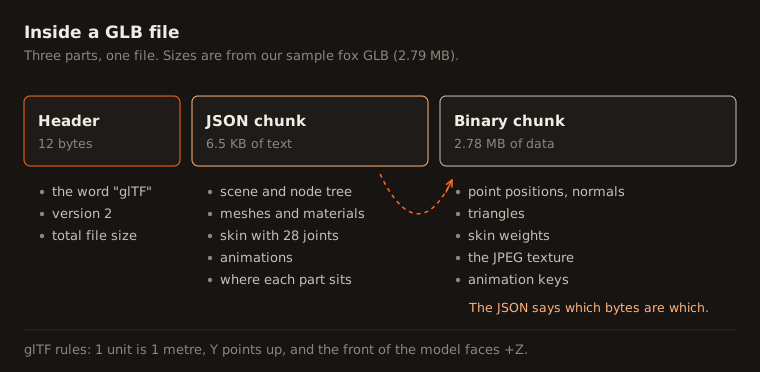
- A 12-byte header. It starts with the letters “glTF”, then the version number (2) and the total file size.
- A JSON chunk. This is a text description of the scene: which meshes exist, where they sit, which materials they use, and how the skeleton and animations are set up.
- A binary chunk. This holds the heavy data: point positions, triangles, texture images, skin weights and animation keys.
Together, those parts can store:
- Meshes: the shape, made of triangles.
- Materials: color, metal, roughness, bumps (normal maps), glow and see-through settings. This is called PBR, for physically based rendering.
- Textures: the images painted on the surface, as PNG or JPEG.
- A skeleton and skin weights: so the model can bend. See what rigging is.
- Animations: moves stored as keyframes.
- Morph targets: stored shapes, like a smile.
- Cameras.
glTF also has fixed rules for size and direction. One unit is one metre. The Y axis points up. The front of a model faces +Z. That makes GLB files from different tools line up the same way.
Here is a real example. Our sample fox is a 2.8 MB GLB. It holds one mesh with 60,000 triangles, one JPEG texture, a skin and a skeleton with 28 joints.
GLB vs glTF: what is the difference?
Both are glTF 2.0. The only difference is how the data is packed.
| .glb | .gltf | |
|---|---|---|
| Files | One binary file | A text file, usually plus a .bin file and image files |
| Easy to share | Yes, it is one file | You must keep the files together |
| Easy to read by eye | No | Yes, the JSON is plain text |
| Best for | Downloads, uploads, the web, apps | Editing by hand and debugging |
A .gltf file can also embed its data as text inside the JSON. The spec notes this makes the data about 33% bigger. That is one more reason most people share .glb.
Blender can save all three kinds: glTF Binary (.glb), glTF Separate (.gltf plus .bin plus textures) and glTF Embedded (.gltf).
GLB vs FBX, OBJ and STL
| Format | Who owns it | Textures | Skeleton and animation | Best for |
|---|---|---|---|---|
| GLB | Open standard (Khronos) | Yes, inside the file | Yes | Web, Android, Godot, Blender, AI 3D tools |
| FBX | Autodesk | Yes, can be embedded | Yes | Unity, Unreal Engine, Maya, 3ds Max |
| OBJ | Open, from Wavefront | Yes, through a separate .mtl file | No | Simple static models, sharing between tools |
| STL | Open, from 3D Systems | No | No | 3D printing |
If you need to switch between them, see how to convert GLB to FBX or our guide on 3MF vs STL vs OBJ for printing.
How to open a GLB file
On Windows
For years, Windows users could double-click a GLB to open it in Microsoft’s 3D Viewer. That has changed. Microsoft deprecated 3D Viewer in February 2026 and removed it from the Microsoft Store on July 1, 2026. It was never preinstalled on Windows 11. Paint 3D and 3D Builder were removed in 2024.
So today, use one of these:
- Blender (free): File, then Import, then glTF 2.0 (.glb/.gltf).
- A web viewer. Microsoft suggests the Babylon.js Sandbox. Drag the GLB onto the page.
On a Mac
On macOS 27 (released September 14, 2026), the Preview app opens GLB and glTF files, along with STL, OBJ and USD. Double-click the file, or open it from Preview.
On macOS 26 or older, Apple only documents USD support in Preview. Use Blender or a web viewer instead.
In a web browser
These free viewers open GLB files without an account:
- glTF Viewer by Don McCurdy (gltf-viewer.donmccurdy.com)
- Khronos glTF Sample Viewer, the official reference viewer
- Babylon.js Sandbox (sandbox.babylonjs.com)
- model-viewer editor (modelviewer.dev/editor), which says it does not send your file to a server
On Android
Android can show GLB files in augmented reality with Google’s Scene Viewer. It has limits. It only plays the first animation, it does not support morph targets, and it allows up to 254 bones. Google recommends keeping models under 100,000 triangles and 10 MB.
On iPhone and iPad
Apple’s AR Quick Look uses USDZ files, not GLB. Apple’s Reality Converter app can turn a glTF file into USDZ on a Mac.
How to edit a GLB file
Blender is the easiest free option.
- Open Blender and delete the default cube.
- Go to File, Import, glTF 2.0 and pick your GLB.
- Edit what you need: the shape, the materials or the animation. Blender stores each animation as an action on its own track.
- Go to File, Export, glTF 2.0. Choose glTF Binary (.glb) as the format.
Keep in mind that glTF export turns four-sided faces into triangles. Blender’s area lights, world lighting and curves are not saved either.
How to convert a GLB file
- GLB to STL for 3D printing: use our free GLB to STL converter. It runs in your browser, and nothing is uploaded.
- GLB to OBJ for other 3D tools: use the free GLB to OBJ converter.
- OBJ to GLB: use the free OBJ to GLB converter.
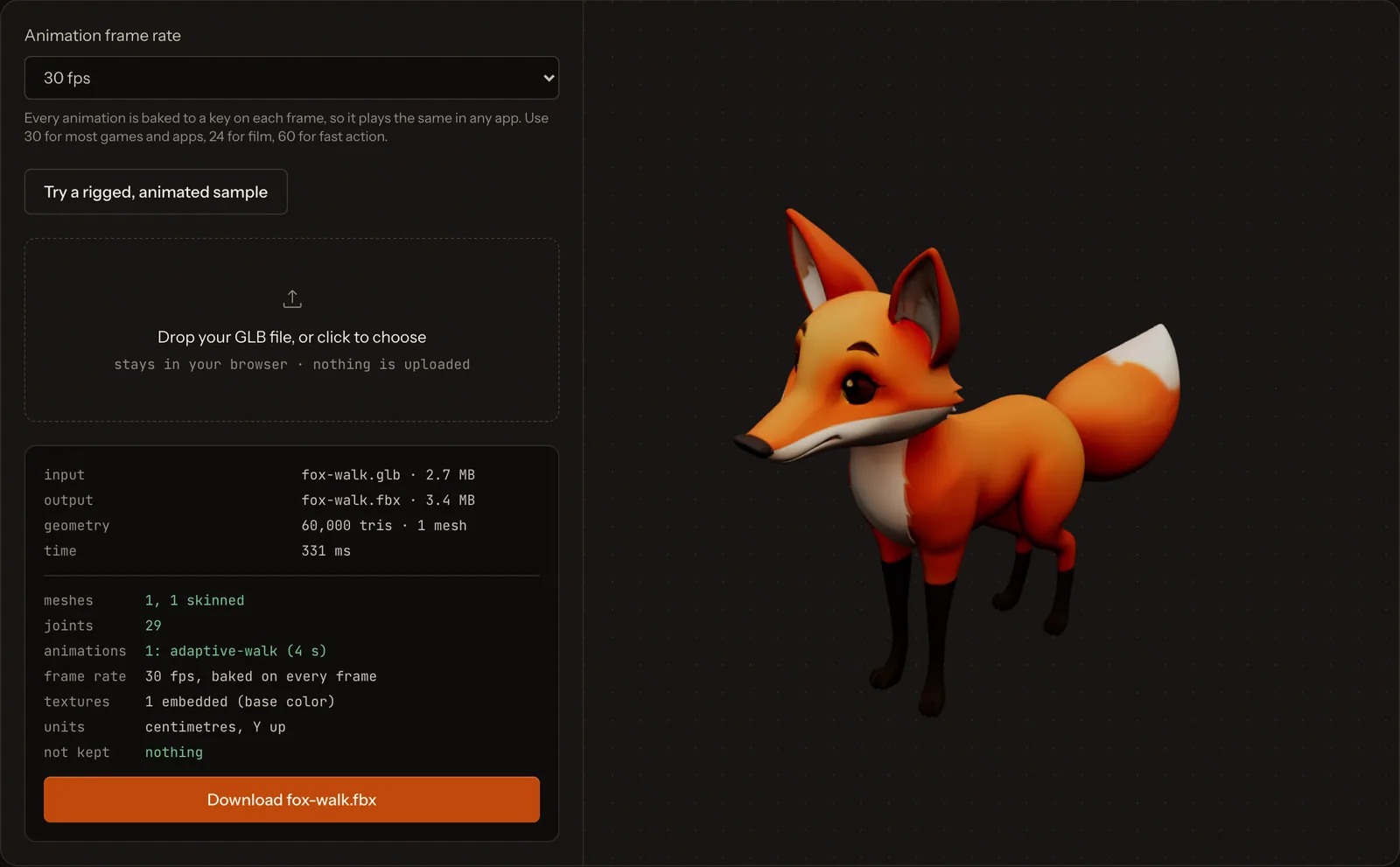
- GLB to FBX with the skeleton and animation: use our free GLB to FBX converter, or Blender. Our GLB to FBX guide compares both and lists the Blender export settings.
- GLB to USDZ for Apple devices: use Apple’s Reality Converter.
Common GLB problems
- The model is tiny or huge. glTF uses metres. A model made in centimetres will look 100 times too big. Scale it on import.
- Textures are missing. Core glTF only supports PNG and JPEG. Some files use newer image types, like KTX2 or WebP, through extensions that older viewers skip.
- The model looks broken in one viewer only. Compression extensions, like Draco, need support in the viewer. Try the file in another viewer.
- Rig controls are gone. glTF stores the skeleton, skin weights and keyframes. It does not store rig controls, constraints or inverse kinematics. Bake the animation before export.
- Only one animation plays. Some viewers, like Android’s Scene Viewer, play only the first animation in the file.
GLB files from Bake3D
Bake3D exports every model as a GLB. You can pick a rigged GLB in its rest pose, or an animated GLB with the motion baked into keyframes. Every export stands on the ground at the center, faces +Z and has Y pointing up, just as glTF expects. Animated exports start with a ground-level joint called motion_root, so engines can read root motion if you want it. You can also export FBX, STL or OBJ from the same model.
To see one in action, open the image to 3D page, or read how to bring a GLB into Blender, Unity, Unreal Engine or Godot.
Questions people ask
Is a GLB file the same as a glTF file?
They use the same format, glTF 2.0. A .glb file packs everything into one binary file. A .gltf file is a text file that usually comes with a separate .bin file and image files. You can convert one to the other without losing anything.
How do I open a GLB file on Windows?
Microsoft removed its 3D Viewer app from the Microsoft Store on July 1, 2026, so do not count on it. Use Blender, which is free, or drag the file into a web viewer such as the Babylon.js Sandbox, which Microsoft itself suggests.
Can I 3D print a GLB file?
Yes, after a quick check. Some slicers, like Bambu Studio and Cura, open GLB directly. Others need STL or 3MF. Our free GLB to STL converter makes an STL in your browser. Set the size in millimetres before printing, because GLB uses metres.
Is GLB better than FBX?
Neither is better for everything. GLB is an open standard that is great for the web, Android, Godot and Blender. FBX is owned by Autodesk and is the classic choice for Unity and Unreal Engine. Many tools, including Bake3D, can export both.
Why is my GLB file so big?
Big textures are the usual reason. A 4096 by 4096 image can take several megabytes on its own. Dense meshes add more. Shrink the textures, reduce the polygon count, or use a compression extension if your viewer supports it.
Sources
About this guide
Written and kept up to date by the Bake3D team. We build a tool that turns one image into a textured, rigged and animated 3D model, and we test the steps in our guides on our own files. First published . See how we write and check guides, or send a correction to hello@bake3d.ai.
Keep reading
File formats
How to Convert GLB to FBX (and FBX to GLB)
Convert GLB to FBX and keep the bones, skin weights and animation: a free browser converter, or Blender with the export settings that matter.
3D printing
3MF vs STL vs OBJ: Which File Format Is Best for 3D Printing?
STL, 3MF and OBJ compared for 3D printing: what each file stores, which slicers open them, and which one to pick for your next print.
Blender
Import a rigged, animated GLB into Blender
Import a rigged, animated GLB into Blender with the Bake3D add-on or by hand, then check the armature, textures and every animation before you edit it.