3MF vs STL vs OBJ: Which File Format Is Best for 3D Printing?
STL is the file almost everyone knows. 3MF is the file most modern slicers save by default. OBJ sits in between. This guide explains what each one stores, where each one breaks, and which to use for your next print.
By the Bake3D teamUpdated 6 min read
Short answer
For most prints, save your finished project as 3MF and share plain models as STL. STL is the most widely supported, but it only stores triangles, with no units, colors or settings. 3MF is a newer, zipped format that stores units, several objects, colors and slicer settings in one file. OBJ can carry colors and textures through a separate MTL file, but it has no units either. Every major slicer opens all three.
How we checked this: The format facts come from the 3MF specification, 3D Systems, Blender's manual and the slicers' own documentation and source code, read on 25 September 2026. The slicer table reflects PrusaSlicer 2.9.6, Bambu Studio 2.8.2, OrcaSlicer 2.4.2 and Cura 5.13. The size math comes from the binary STL layout.
You can print the same object from an STL, a 3MF or an OBJ file. The slicer will turn any of them into printer instructions. The difference is what else travels with the shape: the size units, the colors, the other parts and your settings. Those extras decide which format saves you time.
The quick comparison
| STL | 3MF | OBJ | |
|---|---|---|---|
| Stores | Triangles only | Triangles, units, parts, colors, settings | Shape, UVs, colors and textures through a .mtl file |
| Units | None | Yes, millimetres by default | None |
| Several objects in one file | No | Yes | Yes, as groups |
| Color | No | Yes, with the materials extension | Yes, through materials and textures |
| Slicer settings | No | Yes, saved by each slicer | No |
| File type | Binary or text | A ZIP of XML files | Text |
| Best for | Sharing a single model anywhere | Saving and sharing whole print projects | Colored or textured models, moving between 3D tools |
What is an STL file?
STL is the oldest and simplest 3D printing format. It was created at 3D Systems in the mid-1980s. 3D Systems dates it to 1986, and many guides say 1987. The name comes from stereolithography, the first 3D printing method.
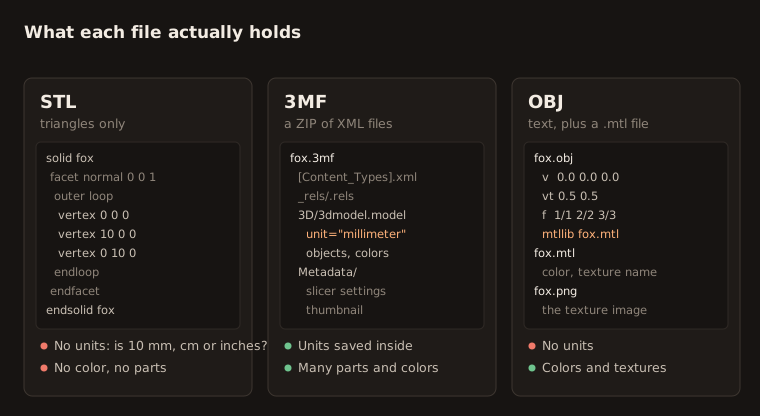
An STL file is a list of triangles. Each triangle has three corners and a direction it faces. That is all. There is:
- No unit. The numbers could mean millimetres, inches or metres. Slicers assume millimetres.
- No color, material or texture.
- No link between triangles. Each triangle stands alone, which makes STL files bigger than they need to be.
STL comes in two kinds: text (ASCII) and binary. Binary is smaller. A binary STL uses 50 bytes per triangle, plus an 84-byte header. So a model with 200,000 triangles is about 10 MB.
What is a 3MF file?
3MF stands for 3D Manufacturing Format. The 3MF Consortium, a group of 3D software and printer companies, released it in 2015. Its members today include Autodesk, Microsoft, HP, Prusa Research, Materialise and 3D Systems. It became an international standard, ISO/IEC 25422, in 2025.
A 3MF file is really a ZIP folder full of XML text files. Inside, it can hold:
- Units. Millimetres by default. Microns, centimetres, inches, feet and metres work too.
- Several objects, placed where they should sit on the build plate.
- Colors and materials, through the Materials and Properties extension.
- A thumbnail picture.
- Slicer settings, such as layer height, supports and filament.
That last point is why PrusaSlicer, Bambu Studio, OrcaSlicer and Cura all save projects as 3MF. Open the file tomorrow and every setting is still there.
There is one catch. Each slicer stores its own settings in its own way. Bambu Studio, for example, uses the 3MF Production Extension, and Bambu’s own wiki explains why some other slicers cannot fully open its project files.
What is an OBJ file?
OBJ comes from Wavefront, a 3D graphics company, and is a plain text format. It stores the shape and the UV map, which tells a texture where to sit. Colors and textures live in a second file, the .mtl file, with the images next to it.
OBJ is popular for moving models between 3D programs. For printing, remember two things:
- It has no units, just like STL.
- It has no skeleton or animation. Blender’s manual lists no support for armatures, lights or cameras in OBJ.
Slicers treat OBJ colors differently. Bambu Studio can import OBJ geometry with color information. PrusaSlicer’s documentation says material and texture are ignored when it imports an OBJ.
3MF vs STL: which should you use?
Use STL when:
- You are sharing one model with people who use many different programs.
- You are uploading to a site that only accepts STL.
- The model is a single piece in a single color.
Use 3MF when:
- You want to save a finished print setup to use again.
- The model has several parts or several colors.
- You want the units to be clear, so nobody prints it 25 times too small.
- You are sending a ready-to-print project to someone with the same slicer.
STL vs OBJ
Pick OBJ over STL when you need colors or textures to come along, or when the model is going into another 3D program before printing. Pick STL when the model is going straight to a slicer. Our free STL to OBJ and OBJ to STL converters switch between them in your browser. The OBJ to STL tool asks for the source unit and up axis, so the result comes out in millimetres with Z up.
Which slicers open which files
| Slicer | STL | 3MF | OBJ | GLB or glTF |
|---|---|---|---|---|
| PrusaSlicer 2.9.6 | Yes | Yes, project format | Yes, materials ignored | No |
| Bambu Studio 2.8.2 | Yes | Yes, project format | Yes, with color | Yes, plus FBX |
| OrcaSlicer 2.4.2 | Yes | Yes, project format | Yes | No |
| Cura 5.13 | Yes | Yes, project format | Yes | Yes |
Bambu Studio added GLB, glTF and FBX import in version 2.7.1, in June 2026. If your slicer does not read GLB, our free GLB to STL converter makes an STL first.
Other files you may run into
- STEP (.step, .stp) is a CAD format with exact curves instead of triangles. PrusaSlicer, Bambu Studio and OrcaSlicer turn it into triangles when they import it.
- AMF was an earlier attempt to replace STL. You will rarely see it now.
- G-code is not a model. It is the list of moves for one printer, made by a slicer. Do not share G-code as a model, because it only fits one printer and one material.
- GLB is common for AI-generated and web 3D models. See what a GLB file is.
The most common mistake: units
Because STL and OBJ have no units, a model can arrive the wrong size. Two classic cases:
- The model is tiny. It was made in metres, so a 0.1 m figure became 0.1 mm. Scale it up by 1,000.
- The model is 25 times too small or too big. It was made in inches. One inch is 25.4 mm.
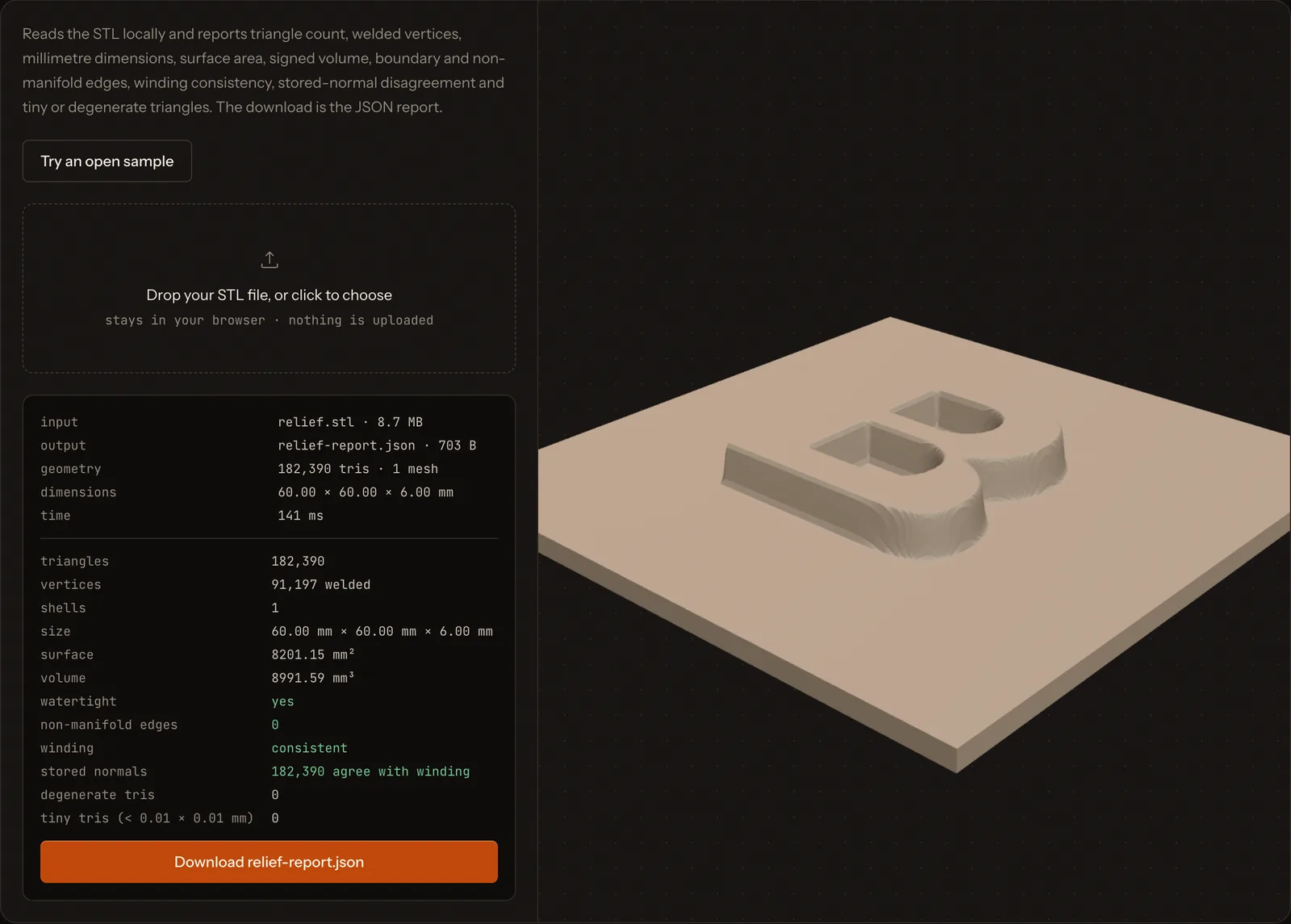
3MF avoids this, because the unit is stored inside the file. When you use STL, always check the size in your slicer before you print. Our free STL checker shows the real size in millimetres, the triangle count and whether the mesh is closed.
How to convert between formats
- 3MF to STL: use our free 3MF to STL converter. It reads the unit inside the 3MF and writes millimetres.
- STL to 3MF: open the STL in any slicer and save the project. The slicer writes a 3MF.
- OBJ to STL and STL to OBJ: use our free OBJ to STL and STL to OBJ converters.
- GLB to STL: use the free GLB to STL converter.
All of these run in your browser. Your file is never uploaded.
If you do not have a model yet, see how to make an STL file, or turn a picture into a printable model with how to 3D print a picture.
Questions people ask
Is 3MF better than STL?
For your own projects, usually yes. 3MF stores the units, several parts, colors and your slicer settings in one file. STL is still the safest choice for sharing a plain model, because every program in 3D printing can open it.
Can I convert 3MF to STL?
Yes. Our free 3MF to STL converter reads the units inside the 3MF and writes an STL in millimetres, in your browser. Colors and slicer settings are dropped, because STL cannot store them.
Why won't a Bambu Studio 3MF open in another slicer?
Bambu Studio saves some project data using the 3MF Production Extension and its own settings. Other slicers may not read those parts. Export the plain model as STL, or as a generic 3MF, when you share with people using other slicers.
Does an STL file store color?
No. The STL format stores only triangles. A few programs hide color in unofficial ways, but they do not work with each other. Use 3MF or OBJ if you need color.
Which file does a 3D printer actually read?
Most printers read G-code. A slicer turns your STL, 3MF or OBJ into G-code made for one printer, one material and one set of settings. That is why you should share the model, not the G-code.
Sources
About this guide
Written and kept up to date by the Bake3D team. We build a tool that turns one image into a textured, rigged and animated 3D model, and we test the steps in our guides on our own files. First published . See how we write and check guides, or send a correction to hello@bake3d.ai.
Keep reading
3D printing
How to Make an STL File for 3D Printing
Five ways to make an STL file: from a photo, a logo, a quick design, an existing 3D model or an AI tool. Plus how to check it before you print.
File formats
What Is a GLB File?
A GLB file is a whole 3D model in one file. Learn what it holds, how it differs from glTF and FBX, and how to open it on Windows, Mac or the web.
3D printing
How to 3D Print a Picture: Relief, Lithophane or Full Model
Three ways to 3D print a photo or picture: a raised relief, a backlit lithophane or a full 3D model. Settings, checks and limits for each one.