How to animate a 3D character by describing the motion
You can now type "the dragon shakes its head and roars" and get a moving 3D character back. But each text to motion tool has rules. Most only move human-shaped skeletons, some need their own character, and free plans limit downloads. This guide shows what each tool needs, then walks you through it step by step.
By the Bake3D teamUpdated 13 min read
Short answer
To animate a 3D character from text, you need a rigged character and a tool that turns words into motion. DeepMotion SayMotion, Uthana, Krikey, QuickMagic and Meshy make text to motion for human-shaped (humanoid) skeletons. Bake3D writes motion for any body it builds, like a fox, a robot or a T. rex, and you can try it free on its demo characters. Export the result as FBX or GLB.
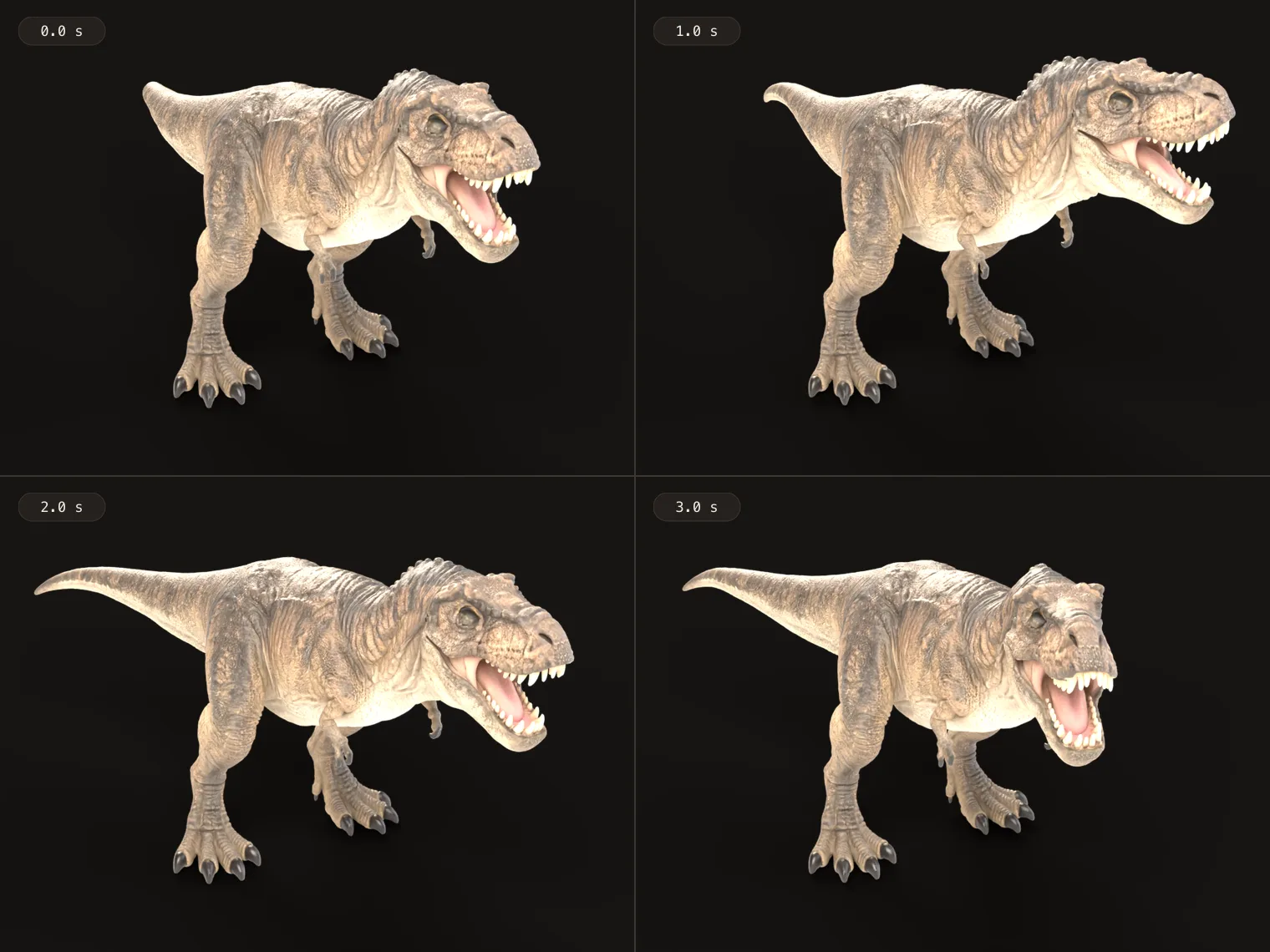
How we checked this: On 9 October 2026 we read each tool's own docs, help pages, pricing pages and terms, linked under Sources. We did not run the same prompt through every tool, so this compares what each tool needs and allows, not how good the motion looks. Bake3D facts come from our own product: the timing figures are medians of real described motions on Bake3D from 24 September to 8 October 2026, and the pictures show our own demo and free models.
Text to motion is the newest way to animate a 3D model. You write what should happen. A program turns your words into keyframes on the character’s skeleton. You get a 3D file you can turn around, light and drop into a game, not a flat video.
There is one big catch. A motion has to fit a skeleton, and almost every text to motion tool expects a human one: two arms, two legs, a spine and a head. If your character is a fox, a dragon or a robot arm, read the section on animals, creatures and robots first.
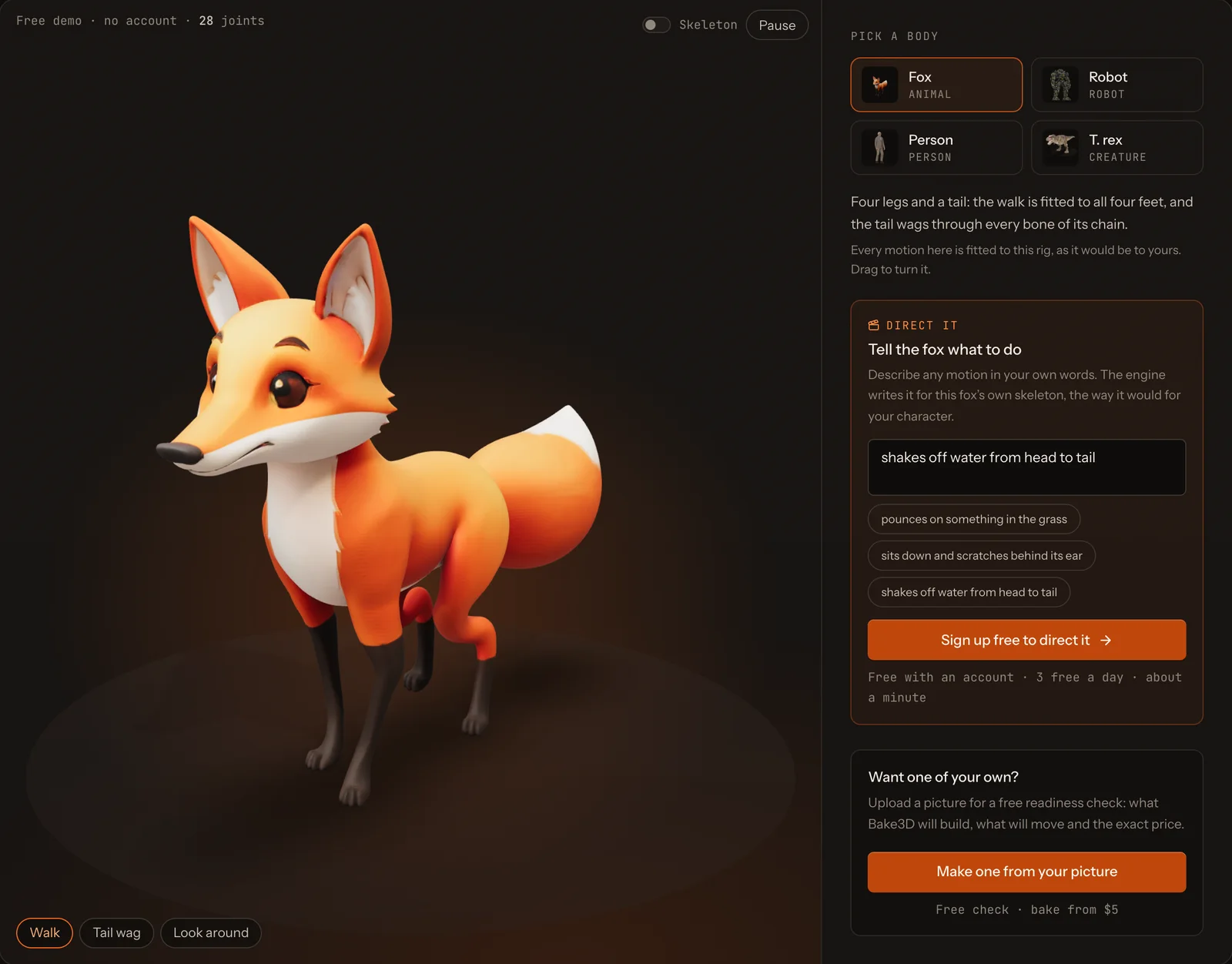
If you want to try it right now, the free demo has a “Direct it” box. Pick a fox, a robot, an old man or a T. rex, type a motion, and Bake3D writes it for that body. To make your own character from a picture, start on the 3D character maker page.
What you need before you start
Every tool on this page needs three things.
- A rigged character. A rig is a skeleton inside the model, plus skin weights that tell the surface how to follow each bone. If the idea is new, read what rigging is. Some tools give you a ready character. Some rig yours. One makes the character for you.
- A body the tool understands. Most text to motion tools only move humanoid skeletons. Check this before anything else.
- A place to use the result. Know which file your game engine or app wants. FBX suits Unity and Unreal. GLB suits Godot, Blender and the web.
Text to motion tools compared
Here is what each tool says it does, from its own pages, checked on 9 October 2026.
| Tool | What goes in | Moves non-humanoid bodies? | Your own character? | Best for |
|---|---|---|---|---|
| DeepMotion SayMotion | A prompt and a stock or uploaded humanoid | No, human motion only | Yes: FBX, GLB or VRM in a T-pose | People, with an MP4 preview too |
| Uthana | A prompt and a two-legged character | No, bipeds only | Yes: FBX or GLB under 30 MB | Game teams with an API |
| Krikey AI | A prompt and a Krikey avatar | No, two-legged only | Not on the free plan | Quick videos with avatars |
| QuickMagic | A prompt | No, made for humanoids | Retarget the file after | Short humanoid clips |
| Meshy | A prompt and a rigged biped | No, bipeds only | Yes, after Meshy rigs it | Meshy users with human characters |
| Bake3D (ours) | A picture or a sentence, then a motion in words | Yes, any body it builds | No, only models it makes | Animals, creatures and machines |
And here is what comes out, what is free and what it costs.
| Tool | Exports | Free tier | Price |
|---|---|---|---|
| DeepMotion SayMotion | FBX, GLB, BVH, MP4 | 3 credits and 1 download a month, personal use, 10 s clips | Starter $15 a month, or $9 a month billed yearly |
| Uthana | FBX, GLB, BVH | Free outputs are CC BY 4.0; allowance not listed | $0.10 a second of motion, pay as you go |
| Krikey AI | MP4, GIF, PNG; FBX on paid plans | 20 credits once | Pro $15 a person a month |
| QuickMagic | FBX free; more formats paid | 15 seconds a day, no commercial license | Basic $14.90 a month |
| Meshy | FBX, or BVH in the API | 100 credits a month; text to motion on free not stated | 3 credits a clip in the web app; Pro is $20 a month |
| Bake3D (ours) | GLB, FBX | Direct the 4 demo characters, 3 a day | 10 credits a motion, after a 65 credit character |
Three more tools come up often. Sloyd offers text to animation on its Plus plan, at $15 a month, for humanoids it rigs in a T-pose or A-pose. Tripo mentions text to motion on its image to 3D page, but its animation docs only list ready presets, so we could not confirm it. Cascadeur has AI posing and in-betweening, but no text to motion that we could find.
How we checked
On 9 October 2026 we read each tool’s own docs, help pages, pricing and terms. Every fact in the table links to its source at the end of this page. When a company’s pages disagree, we say so. For example, Krikey’s FAQ says it only covers two-legged characters, while its home page shows a tiger and a unicorn.
For Bake3D, we measured our own production numbers from 24 September to 8 October 2026. Across 121 described motions, the typical one was ready in about 35 seconds. Across 239 bakes, the typical character took about 8 minutes from picture to finished rig. We also used our four demo characters and our free 3D models for the pictures on this page.
We did not type the same prompt into every tool. So this guide compares what each tool needs and allows, not how good its motion looks. Try two tools with your own prompt before you pay.
DeepMotion SayMotion
SayMotion turns a text prompt into a 3D animation in your browser. You can use one of its characters or upload your own as FBX, GLB or VRM.
What it needs. Its custom character page asks for a humanoid in a T-pose, standing on the ground, with one root joint. It also says it can only capture human motion for now.
Pros. It exports FBX, GLB, BVH and MP4, so you get a game file and a quick video from one prompt. Its docs say one animation costs one credit.
Limits. The free plan gives 3 credits and 1 download a month, clips of up to 10 seconds, and a personal-use license. Starter, at $15 a month or $9 a month billed yearly, adds unlimited downloads, 20 second clips and a commercial license.
Uthana
Uthana makes motion from text for two-legged characters. It rigs your FBX or GLB file if it is under 30 MB, and it can move motion onto any two-legged skeleton.
Pros. Downloads come as FBX, GLB or BVH at 24, 30 or 60 frames per second. It has an API, which helps if you make many clips.
Limits. Its auto-rigging page lists bodies that are not human-shaped as a hard case. Pricing is pay as you go: $0.10 per second of motion on its newest model. Its FAQ says it stopped selling new subscriptions in August 2026. Its terms say free-plan results are licensed to you under CC BY 4.0, so you must credit Uthana.
Krikey AI
Krikey is an animation app with ready 3D avatars. You can type a motion, dress an avatar, or make one from a picture, then export a video.
Pros. It is quick for social videos and simple scenes. It exports MP4, GIF and PNG.
Limits. Its FAQ says it only covers two-legged characters today. FBX export and uploading your own character need a paid plan. The free plan is 20 credits, given once. Pro is $15 a person a month. Its terms allow commercial use up to $100,000 in revenue, then ask for a license.
QuickMagic
QuickMagic is best known for motion capture from video, and it also has text to motion. It makes a 3D file, up to 10 seconds per clip.
Pros. You can try it free, up to 15 seconds a day.
Limits. Its page says it is made for humanoid characters. The free plan exports FBX only and has no commercial license. Basic is $14.90 a month, or $11.90 a month billed yearly, and adds more formats and a commercial license.
Meshy
Meshy added text to motion to its web app in July 2026 and to its API on 21 August 2026. You describe a move and apply it to a character Meshy has rigged as a biped.
Pros. If your characters are people, Meshy is one tool for the model, the rig, 600+ ready human clips and text to motion. Its credits guide lists text to motion at 3 credits in the web app. In the API, a clip costs 10 credits for FBX or 3 for a quicker BVH, plus 3 credits to apply it, and clips are 2 to 10 seconds.
Limits. Text to motion goes onto biped rigs. Its help center says walking is the only animation for four-legged animals, and models rigged with its beta Smart Rig cannot use the animation library yet. Our Meshy AI review covers the rest of its limits.
Bake3D
Bake3D is our own tool, so read this part with that in mind. It makes a textured 3D model from a picture or a sentence, plans a skeleton from the model’s own shape, and then writes motion from your words.
Pros. It works on bodies the other tools skip. Each joint gets a job name, like tail, wing, front left leg or wheel. Your words are turned into a motion program that moves those joints, so “wag the tail and look left” works on a fox, and “stomp forward” works on a T. rex. Playback is repeatable: the same program on the same rig gives the same pose at the same time. A described motion can be 0.5 to 20 seconds long.
Cost. A described motion is 10 credits, about $0.48 to $0.63 at pack prices. You need a character first. A rigged character at Standard quality is 65 credits, and the rig comes with a four-second first motion. Packs start at $5 for 80 credits, and there are no free credits. The full list is on the pricing page.
Limits. It only animates models Bake3D makes, not a model you upload. It moves the body, not the face, so there is no lip sync. A described motion is a strong first draft, not a finished performance. It makes 3D files, not a video.
Animals, creatures and robots

Most text to motion tools learn from recordings of people moving. That is why they stop at the human body. A dog bends its legs in different places. A bird has wings. A snake has no legs at all. A human walk cannot be bent to fit them.
So for a non-human character, you have three choices:
- Animate it by hand in Blender. It is free and works for any body, but it is slow. Our quadruped walk cycle guide gives you the footfall order and timing.
- Use ready clips from an AI rigger. Meshy, Tripo and others rig some animals, but most give a creature one walk. Our Mixamo alternatives guide counts the clips for each body type.
- Use a tool that writes motion for any rig. Bake3D does this for the models it builds. The AI 3D animation generator page shows how.
Step by step: animate a character with Bake3D
Try it free on a demo character
- Open the demo. You can play the walk and other ready motions without an account.
- Pick a body: the fox, the robot, the old man or the T. rex.
- In the Direct it box, type what it should do, up to 200 characters. For example: “shakes off water from head to tail”.
- Sign up for a free account. You can direct 3 motions a day.
- Watch the result. Each directed motion is a four-second loop, written for that character’s own skeleton.
Animate your own character
- Make the character. Upload a picture, or describe it in a sentence. The free readiness check tells you what Bake3D will build, which parts will move and the exact price. Then bake it. The typical bake took about 8 minutes from picture to finished rig.
- Watch its first motion. The rig comes with a four-second intro. Use it to check the joints before you ask for more. Our rig checklist shows what to look for.
- Describe the motion. Open the Motion tab and write one or two plain sentences. The tips below help.
- Check it. Play it at full speed, then step frame by frame. If something is off, ask for a change. An optional visual critique round costs 5 credits.
- Export. Download an animated GLB with your clips, or an FBX with one clip, at 24, 30 or 60 frames per second. Pick whether the character stays in place or travels forward.
Step by step: animate a humanoid with SayMotion
If your character is a person, here is the same job in DeepMotion SayMotion, from its own docs.
- Pick or upload a character. Use a SayMotion character, or upload a humanoid as FBX, GLB or VRM. It must stand in a T-pose with its feet on the ground.
- Type the prompt. Describe the action, like “jogs forward, then jumps over a puddle”.
- Generate. Each animation uses one credit.
- Export. Download FBX, GLB or BVH, or an MP4 video. On the free plan you get 1 download a month, for personal use only.
How to write a motion prompt that works
The words you type matter. These tips work in any tool.
- Say the action first. “Jumps”, “bows”, “sniffs the ground”. Then add details.
- Give the timing. “Slowly”, “three quick hops”, “pauses for a second”.
- Name the body parts. “Wags the tail”, “flaps both wings”, “turns the head left”.
- Say where it goes. In place, or moving forward. Games often want in place, then move the character in code.
- Keep it to one idea. “Waves hello, then takes a bow” works. A whole dance routine in one prompt often turns to mush.
- Ask for a loop if it must repeat, like an idle or a walk.
For example, “shakes off water from head to tail, starting slow, then fast” gives the engine much more to work with than “do something cute”.
Check the result before you use it
AI motion can look great in one frame and wrong in the next. Before you put a clip in your game, look for these:
- Sliding feet. A foot on the ground should stay put until it lifts.
- A jump at the loop. Watch the last frame turn into the first.
- Parts passing through the body. Arms into the chest, a tail through a leg.
- Fast frames. Step through the quickest moment frame by frame.
To check a file without opening a big app, drop it into our free online 3D viewer. It plays each clip, draws the skeleton and lets you step frame by frame. If you need a different format, the free GLB to FBX converter keeps the skeleton, skin weights and every clip.
For the other ways to animate, like keyframes, libraries and motion capture, read how to animate a 3D model. For free tools, see our guide to free 3D animation software.
Questions people ask
Can AI animate a 3D character from a text prompt?
Yes. You type a motion, like "walks forward, stops and waves", and the tool makes keyframes for a rigged character. DeepMotion SayMotion, Uthana, Krikey, QuickMagic, Meshy and Bake3D all do this. The result is a 3D file you can use in a game or in Blender, not a video.
What is the best AI text to 3D animation tool in 2026?
It depends on the body. For people, SayMotion, Uthana and Meshy all make text to motion, and Meshy also has a large library of ready clips. For animals, creatures and robots, most of these tools stop, because they only move humanoid skeletons. Bake3D makes motion from text for any body it builds.
Is there a free text to motion AI for 3D characters?
There are free tiers with limits. SayMotion's free plan gives 3 credits and 1 download a month, for personal use. QuickMagic gives 15 seconds a day, without a commercial license. Krikey gives 20 credits once. Bake3D lets you direct its four demo characters for free, 3 times a day with a free account.
Can text to motion animate animals or non-humanoid characters?
Most tools cannot. SayMotion, Uthana, Krikey, QuickMagic and Meshy's text to motion are built for two-legged, human-shaped skeletons. Bake3D labels each joint by its job, like tail, wing or front left leg, so it can write motion for a dog, a bird or a robot arm, but only for models it makes.
Can I use my own 3D character with AI text to animation?
With most humanoid tools, yes. SayMotion takes FBX, GLB or VRM in a T-pose, Uthana rigs FBX or GLB files under 30 MB, and Meshy rigs an uploaded model first. Bake3D cannot animate a model you upload. It makes the model from a picture or a sentence, then rigs and animates it.
What file do I get from AI text to 3D animation?
Usually FBX, often GLB, and sometimes BVH, which holds motion without a mesh. Some tools also render an MP4 video. Pick FBX for Unity and Unreal, and GLB for Godot, Blender and the web.
Sources
- DeepMotion, SayMotion docs
- DeepMotion, custom characters in SayMotion
- DeepMotion, SayMotion pricing
- DeepMotion, animation credits
- Uthana, text to motion
- Uthana, auto-rigging
- Uthana, pricing
- Uthana, FAQ
- Uthana, terms
- Krikey AI, FAQ
- Krikey AI, pricing
- Krikey AI, terms
- Meshy docs, web app changelog
- Meshy, credits guide
- Meshy API, text to motion
- Meshy API changelog
- Meshy, animation library
- Meshy Help Center, auto-rigging and animation
- QuickMagic, text to motion
- QuickMagic, text to 3D animation
- QuickMagic, pricing
- Sloyd, pricing
- Sloyd, animations
- Cascadeur, AI tools help
- Cascadeur, plans
About this guide
Written and kept up to date by the Bake3D team. We build a tool that turns one image into a textured, rigged and animated 3D model, and we test the steps in our guides on our own files. First published . See how we write and check guides, or send a correction to hello@bake3d.ai.
Keep reading
Animation
How to Animate a 3D Model
Four ways to animate a 3D model: keyframes, motion libraries, motion capture and described motion. What each one needs and when to use it.
Animation
The Best Free 3D Animation Software for Each Job
The best free 3D animation software by job: Blender, Cascadeur, Mixamo, Unreal, Unity, Godot and AI motion tools, with each license and limit checked.
Rigging tools
Mixamo Alternatives for Non-Humanoid Characters: Animals, Creatures and Robots
Mixamo only rigs humanoids. Compare Mixamo alternatives that rig animals, creatures and robots, from Rigify and Mesh2Motion to AI tools, checked October 2026.