Blender MCP: Control Blender With Claude and Other AI Assistants
Blender MCP lets you talk to Blender in plain words through an AI assistant. Ask it to describe a scene, rename a hundred objects or build a quick layout, and it writes and runs the Blender code for you. In 2026 there are two main versions, an official one and a popular community one. This guide explains both, how to set them up, and how to stay safe.
By the Bake3D teamUpdated 6 min read
Short answer
Blender MCP connects an AI assistant, such as Claude, Cursor or Codex, to Blender through the Model Context Protocol. The assistant can read your scene and run Blender Python code for you. There are two main options. The official MCP Server from Blender Lab needs Blender 5.1 or newer and powers the Claude Blender connector. The community MCP for Blender, formerly called blender-mcp, adds free asset libraries and AI model generation. Both can run any code in Blender, so save your work first.
How we checked this: The setup steps, version numbers and tool lists come from blender.org, the Blender Lab repository, the community project's README and Anthropic's announcement, all read on 25 September 2026. The community project was renamed on 16 September 2026, and this guide uses the new names. We describe the Bake3D MCP server from our own documentation.
Blender can do almost anything in 3D, but it has a lot of buttons. Blender MCP puts an AI assistant between you and those buttons. You type “make every material a little darker” or “list the objects that have no UV map”, and the assistant does it by writing Blender Python code and running it in your open scene.
What is MCP?
MCP stands for Model Context Protocol. It is an open standard for connecting AI assistants to other programs. Anthropic introduced it in November 2024. In December 2025 it moved to the Agentic AI Foundation, part of the Linux Foundation.
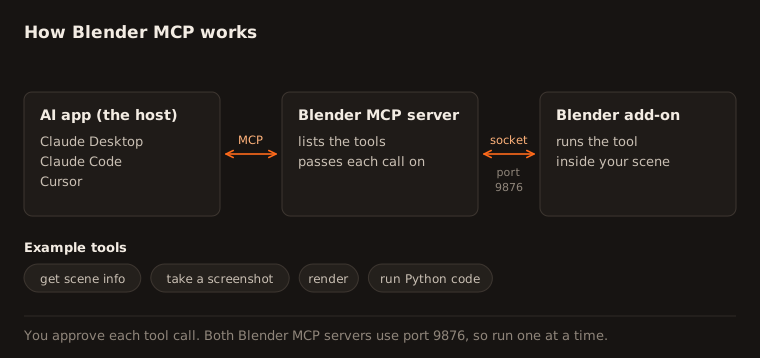
It has three parts:
- The host is the AI app you talk to, like Claude Desktop, Claude Code or Cursor.
- The server is a small program that gives the AI a set of tools, like “get scene info” or “run code”.
- The tools are the actions the AI may take, with your permission.
A Blender MCP server gives the AI tools that work inside Blender.
What Blender MCP can do
Common uses include:
- Describe a scene. “What is in this file? Which objects have missing textures?”
- Do boring work in bulk. Rename objects, fix material names, apply a modifier to many objects.
- Build simple scenes. “Add a floor, three lights and a camera looking at the model.”
- Explain things. Look up the Blender Python API and the manual.
- Take screenshots of the viewport so the AI can see what it did.
The community version can also:
- Download free assets from Poly Haven, and models from Sketchfab and Poly Pizza.
- Generate 3D models with outside AI services, such as Hyper3D Rodin, Hunyuan3D and Tripo.
- Export the scene as GLB or FBX.
Official vs community Blender MCP
| Official MCP Server (Blender Lab) | MCP for Blender (community) | |
|---|---|---|
| Made by | Blender Lab, part of the Blender Foundation | Siddharth Ahuja and contributors |
| Old name | None | blender-mcp, renamed in September 2026 |
| Current version | 1.0.3 (September 2026) | 2.1.0 (September 2026) |
| Blender needed | 5.1 or newer | 3.0 or newer |
| License | GPL-3.0 | MIT |
| Tools | Scene summaries, docs lookup, screenshots, rendering, running code | Scene info, running code, asset libraries, AI model generation, export |
| Claude connector | Yes, this is the one behind it | No, set up by hand |
| Default connection | localhost, port 9876 | localhost, port 9876 |
Both use port 9876 by default. Run only one of them at a time, or change the port on one.
Set up the official Blender MCP server with Claude
Anthropic launched a Blender connector for Claude on April 28, 2026. The Blender developers built the server behind it.
- Install Blender 5.1 or newer.
- In Claude Desktop, open Customize, then Connectors. Search for Blender and click Add. Claude Desktop is needed because Blender must run on the same computer.
- Open the MCP Server page on blender.org. Drag the add-on link into Blender. The first drag adds the Blender Lab extensions repository. The second drag installs the add-on.
- In Blender, open the add-on’s preferences and start the server.
- In Claude, ask a simple question, like “What objects are in my Blender scene?”
For other assistants, the official server comes as an .mcpb bundle, or you can run it from its source code with the uv tool.
Set up MCP for Blender (the community version)
You need Blender 3.0 or newer, Python 3.10 or newer, and the uv package manager. Install uv with its official installer.
- Install the Blender add-on by running this in a terminal:
uvx mcp-for-blender install-addon- In Blender, go to Edit, Preferences, Add-ons and turn on Interface: MCP for Blender.
- In the 3D viewport, press N, open the MCP for Blender tab and click Start MCP Server.
- Connect your assistant. For Claude Desktop, open Settings, then Developer, then Edit Config, and add:
{
  "mcpServers": {
    "blender": { "command": "uvx", "args": ["mcp-for-blender"] }
  }
}
For Claude Code, run:
claude mcp add blender uvx mcp-for-blenderFor Codex, run:
codex mcp add blender -- uvx mcp-for-blenderFor Cursor, put the same JSON as Claude Desktop in Settings, then MCP, or in a .cursor/mcp.json file in your project. On Windows, Cursor needs "command": "cmd" and "args": ["/c", "uvx", "mcp-for-blender"].
Old setups that use uvx blender-mcp still work. The old name now points to the new package.
Stay safe with Blender MCP
Both servers let an AI run any Python code inside Blender. That is what makes them useful, and also what makes them risky.
- Save your work first. The community README says so in capital letters.
- Read what the assistant plans to run, especially commands that delete, move or send files.
- Keep the connection on your own computer. The community add-on’s connection has no password or encryption. Anyone who can reach that port can run code in your Blender.
- Use a spare machine for sensitive work. The official page warns there are no guards to stop data from being deleted or sent elsewhere, and suggests a virtual machine.
- Try safe mode. The community version has one. Set
BLENDER_MCP_SAFE_MODE=1to block file access, network access and other risky code. - Know about telemetry. The community version sends an anonymous usage record by default. Set
DISABLE_TELEMETRY=trueto turn it off.
Prompts to try
- “List every object in the scene with its polygon count, biggest first.”
- “Rename all meshes to match their material names.”
- “Add a three-point light setup around the selected object.”
- “Set up a turntable camera that circles the model in 120 frames.”
- “Find objects with no UV map and tell me which ones.”
- “Decimate the selected mesh to 20,000 triangles and show me the result.”
Start small, check the result, then ask for the next step.
Fix common Blender MCP problems
spawn uvx ENOENTor “uvx not found”. Your app cannot finduvx. Use the full path touvxin the config.- The assistant cannot connect. Make sure the server is started in Blender, and that only one Blender MCP server is using port 9876.
- It worked in one app, then stopped in another. Run the server from one assistant at a time.
- The official add-on will not install. Check that you have Blender 5.1 or newer.
Blender MCP vs a 3D generation API
Blender MCP drives Blender. It is great for scene work, clean-up and automation. It does not rig or animate a new creature by itself. The community version can call outside services to make a static model, but you still need to rig and animate it.
Bake3D has its own MCP server with 14 tools. An assistant can upload an image, generate a textured model, rig it, create a described motion and export an animated GLB or FBX. You need a Pro or Studio API key. The two work well together: make the character with Bake3D, then import the GLB into Blender and let Blender MCP set up the scene.
See the Bake3D MCP workflow guide for setup, and import a rigged GLB into Blender for the Blender side.
Questions people ask
Is Blender MCP official?
There are two. Blender Lab, part of the Blender Foundation, publishes an official MCP Server, which reached version 1.0 in April 2026. The older and very popular community project by Siddharth Ahuja was renamed from blender-mcp to MCP for Blender in September 2026, to make clear it is not made by Blender.
Is Blender MCP free?
Yes. Both servers are free and open source. The official one uses the GPL-3.0 license and the community one uses the MIT license. You may pay for the AI assistant you connect, and the community project also offers a paid Premium tier for some AI model generation.
Does Blender MCP work with ChatGPT, Cursor or Codex?
It works with any app that supports MCP. The community project's README gives setup steps for Claude Desktop, Claude Code, Cursor, Codex, VS Code and others. The official server says it works with many clients and shows a llama.cpp example.
Is Blender MCP safe to use?
Use it with care. Both servers let the AI run any Python code inside Blender. The official page warns there are no guards to stop files from being deleted or sent away, and suggests a virtual machine. Save your work, keep the connection on your own computer and read what the assistant plans to run.
Does Blender have built-in AI?
No. In May 2026, the Blender Foundation said no generative AI functionality is available or planned inside Blender. MCP servers are separate add-ons you choose to install.
Sources
- Blender Lab, MCP Server
- Blender Lab MCP repository
- MCP for Blender (community project) on GitHub
- MCP for Blender rename announcement, issue 366
- Anthropic, Claude for Creative Work
- Blender Foundation, Upcoming Development Fund and AI policies
- Model Context Protocol specification
- MCP joins the Agentic AI Foundation
About this guide
Written and kept up to date by the Bake3D team. We build a tool that turns one image into a textured, rigged and animated 3D model, and we test the steps in our guides on our own files. First published . See how we write and check guides, or send a correction to hello@bake3d.ai.
Keep reading
MCP
Use MCP for an AI-assisted 3D workflow
Connect Bake3D to an MCP assistant, or use the Blender, Unity, Unreal and Godot integrations, to generate, animate and import a 3D model.
Blender
Import a rigged, animated GLB into Blender
Import a rigged, animated GLB into Blender with the Bake3D add-on or by hand, then check the armature, textures and every animation before you edit it.
Blender
How to Reduce Polygon Count in Blender
Lower the polygon count of a 3D model with the Decimate modifier in Blender. Target counts for games, web and mobile, and what to check after.